
Fertilizer Calculator
Fertilizer is where good intentions do the most damage. Faced with three numbers on a bag and no clear dose, people tend to reach for “a bit more for luck” — and overfeeding scorches roots, throws plants into all leaf and no fruit, and washes surplus nutrients into the watershed. Underfeed and growth stalls and yields fade. The right amount sits in a fairly narrow band.
Those three numbers — the N-P-K ratio — are the key, and they’re more useful than they look. This calculator uses them, together with your bed size and the crop’s appetite, to work out how much of your fertilizer to apply per feeding. No guessing, no luck, just a dose matched to the area and the plant.
Fertilizer Calculator
Work out how much fertilizer your bed needs per feeding.
| Crop | Nutrient demand |
|---|---|
| Tomato (indeterminate) | Heavy feeder |
| Tomato (bush/determinate) | Heavy feeder |
| Pepper | Heavy feeder |
| Lettuce (leaf) | Moderate feeder |
| Spinach | Moderate feeder |
| Kale | Moderate feeder |
| Broccoli | Heavy feeder |
| Cabbage | Heavy feeder |
| Carrot | Light feeder |
| Beet | Moderate feeder |
| Radish | Light feeder |
| Onion | Moderate feeder |
| Bush bean | Light feeder |
| Pole bean | Light feeder |
| Pea | Light feeder |
| Cucumber (trellised) | Heavy feeder |
| Zucchini / summer squash | Heavy feeder |
| Pumpkin | Heavy feeder |
| Sweet corn | Heavy feeder |
| Potato | Moderate feeder |
| Basil | Moderate feeder |
| Strawberry | Moderate feeder |
Based on supplying actual nitrogen per 100 sq ft for the crop's feeding level. Always follow the product label if it specifies a lower rate, and water in after applying.
How the fertilizer amount is calculated
The N-P-K numbers are percentages by weight of nitrogen, phosphorus and potassium. A 10-10-10 is 10 percent of each; a 5-10-10 has half the nitrogen. Nitrogen drives leafy growth and is the nutrient most often dosed, so the calculation targets a sensible amount of actual nitrogen per 100 square feet, set by the crop’s feeding level — heavy feeders like tomatoes and brassicas want more, light feeders like carrots and beans want little.
From there it’s arithmetic. The tool works out the pounds of actual nitrogen your bed should receive, then divides by the nitrogen percentage of your product to convert that into pounds of fertilizer to spread — because a low-percentage fertilizer needs more product to deliver the same nitrogen. The result comes in pounds, ounces and grams, with a suggested feeding frequency. It’s a guide to a safe, effective rate; if your product label specifies a lower one, follow the label, and water in after applying so nutrients reach the roots.
Worked example: feeding tomatoes with 10-10-10
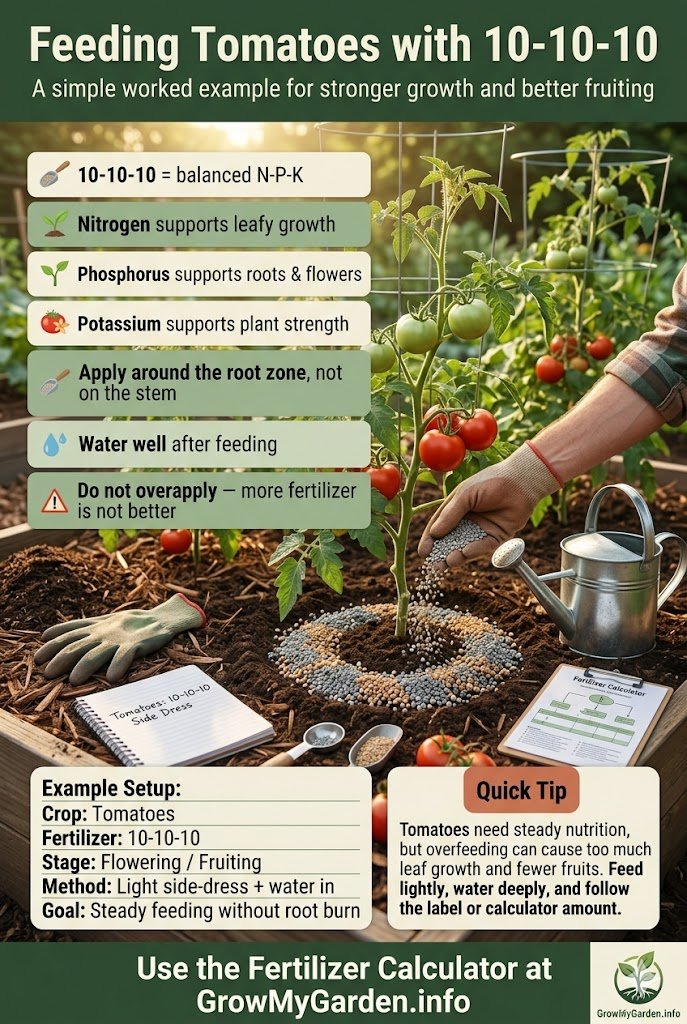
Run the default — an 8-by-4-foot bed of tomatoes fed with a 10-10-10. The bed is 32 square feet, and as heavy feeders the tomatoes are targeted at the higher nitrogen rate. That comes to a small amount of actual nitrogen, which at 10 percent nitrogen works out to roughly 0.96 pounds of fertilizer per feeding — about 435 grams, repeated every three to four weeks through the growing season.
Swap to a fertilizer with a higher first number and you’d need proportionally less product for the same nitrogen; swap to a weaker one and you’d need more. That’s the whole point of dividing by the N-P-K: it tailors the dose to the specific bag in your shed rather than assuming everyone uses the same blend.
Tips for feeding your garden
- Test your soil first if you can. A soil test shows what’s actually lacking, so you’re not adding phosphorus or potassium the ground already has plenty of. It’s the single best way to feed precisely.
- Match the feed to the crop. Leafy greens reward nitrogen, but too much nitrogen on tomatoes or peppers gives lush foliage and little fruit. Fruiting and root crops generally want more phosphorus and potassium, less nitrogen.
- Side-dress at the right moments. Many crops benefit from a top-up of fertilizer worked in beside the rows partway through the season — for tomatoes, around when fruit begins to set.
- Go slow with quick-release products. Granular slow-release feeds are forgiving; concentrated liquid feeds act fast and burn easily, so dilute as directed and don’t double up.
- Organic options work differently. Compost, well-rotted manure and amendments like blood or bone meal release nutrients gradually and improve the soil itself, but at lower, slower concentrations than synthetic blends.
Frequently asked questions
How much fertilizer do I need per square foot? It depends on the crop’s appetite and your fertilizer’s strength, which is why a flat answer misleads. The reliable method targets a set amount of actual nitrogen per 100 square feet, then converts that to product based on the N-P-K — exactly what the calculator does, giving a dose in pounds, ounces and grams.
What does N-P-K mean on fertilizer? The three numbers are the percentages of nitrogen, phosphorus and potassium by weight. Nitrogen fuels leafy growth, phosphorus supports roots and flowering, and potassium aids overall vigour and fruiting. A 10-10-10 is balanced; lopsided ratios target specific needs.
How often should I fertilize vegetables? Heavy feeders like tomatoes and brassicas benefit from feeding every three to four weeks during active growth; lighter feeders need it once or twice a season. Slow-release fertilizers stretch the interval. Always water in after applying so the nutrients reach the root zone.
Can I use organic fertilizer instead? Yes. Compost, aged manure and amendments such as blood meal or bone meal feed plants and build soil structure, though they release nutrients more slowly and at lower concentrations than synthetic products. You generally apply more by volume and feed a little ahead of need.